If disaster recovery is exciting, the business is already having a bad day. The goal is to make the recovery routine, fast, and boring.
When I talk with business owners and IT managers about disaster recovery, the same questions keep showing up: What would we actually lose if a server failed today? How long could we stay down before the damage became visible? Who makes the decisions when the pressure is real? Those are not theoretical questions. They are the questions that decide whether a disruption becomes a short interruption or a very expensive lesson.
If you want a solid baseline, I would start with NIST’s contingency planning guide for federal information systems and Ready.gov’s business continuity planning guidance. Both make the same central point from different angles: recovery is not a backup job, and it is not a hope-based strategy. It is a planned business function with owners, priorities, and tests.
In this guide, I will walk through what disaster recovery means, why planning matters, the core components of a workable plan, how to test and update it, and what real-world incidents teach us about the cost of getting this wrong. If you finish this article with one useful decision, make it this: know what must come back first, and know how you will prove it can come back.
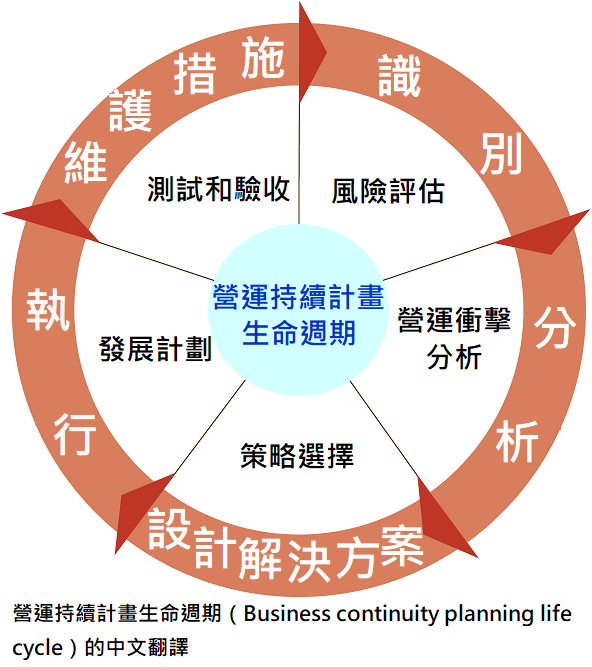
What disaster recovery actually means
Disaster recovery, usually shortened to DR, is the set of procedures used to restore IT systems and data after a disruptive event. That event might be a hardware failure, ransomware, an accidental deletion, a cloud outage, a fire, a flood, a network failure, or a plain old human mistake. The label changes. The operational problem does not.
There is an important distinction here. Backup means you have copies of data. Disaster recovery means you have a documented, tested method for restoring systems and resuming operations. Backups are one tool inside the plan. The plan itself is broader. It includes people, priorities, technical steps, communication, and decision-making under pressure.
Business continuity is the larger umbrella. It covers how the business keeps functioning during disruption, not just how IT systems are restored. Disaster recovery sits inside that broader picture. If your accounting team, customer service team, and shipping process all stop because one system is down, the issue is bigger than restore media and a backup script.
Key terms worth defining clearly
| Term | Meaning | Why it matters |
|---|---|---|
| RTO | Recovery Time Objective. The maximum acceptable time to restore a service. | Shows how quickly a system must be back before the business feels the damage. |
| RPO | Recovery Point Objective. The maximum acceptable amount of data loss, measured in time. | Determines how much recent data you can afford to lose. |
| BIA | Business Impact Analysis. A review of what each disruption would cost the business. | Helps decide which systems deserve the fastest recovery. |
| Failover | Moving production work to a backup system or site. | Useful when the primary environment is not available. |
| Failback | Returning operations to the primary environment after recovery. | Prevents the temporary fix from becoming the permanent mess. |
I keep the definitions simple on purpose. A disaster recovery plan should be readable by a business owner, not only by the person who enjoys packet captures in their free time. If the language is too technical for managers to follow, the plan will fail exactly when it needs to be used.
Disaster recovery versus business continuity
Here is the clean version. Business continuity asks, “How do we keep the business running?” Disaster recovery asks, “How do we restore the systems that support the business?” One is the wider operating question. The other is the technical recovery answer. Good companies treat them as connected, not interchangeable.
That distinction matters because some teams build a technically elegant recovery plan that ignores the people and processes around it. They can restore a server, but they cannot answer the customer, reroute the order flow, or tell staff what to do for the next six hours. That is not continuity. That is a demo.
Why planning matters
Disasters are expensive because downtime is expensive. Every hour a critical system stays down usually creates several forms of damage at once: lost sales, support costs, missed deadlines, manual workarounds, customer frustration, and internal confusion. Even if the outage is brief, the business may still spend days cleaning up the operational mess it leaves behind.
The cost is not only financial. Without a plan, people improvise. Improvisation looks brave in a meeting and chaotic in production. You also get inconsistent decisions: one manager wants to wait, another wants to fail over, and nobody knows which system deserves first priority. A recovery plan removes that debate before the crisis starts.
There is also a compliance angle. Many industries expect some level of documented recovery readiness, even if the exact requirements vary. You do not need to build a legal cathedral around it, but you do need a defensible process. If an incident exposes weak planning, “we were going to get to that” is not a great written record.
What poor planning usually costs
- Longer outages because no one knows which system comes first.
- Higher recovery costs because the team is buying time with labor.
- Data loss because backups were not tested or were too old to be useful.
- Reputational damage because customers hear uncertainty instead of a clear update.
- Staff fatigue because the same people are forced to improvise every time.
There is a simple business truth here. If the recovery plan is missing, the recovery cost is rarely just the cost of the technology. It becomes a cost of attention. That is usually the more expensive currency.
The key components of a disaster recovery plan
A solid disaster recovery plan does not need to be bloated. It does need to be complete enough that a different person could use it under stress. I would build it around six pieces: scope, priorities, recovery methods, roles, communication, and proof.
1. Risk assessment and business impact analysis
Start by listing the systems the business depends on and the business impact if each one fails. Do not stop at servers. Include authentication, email, file storage, line-of-business applications, backups, vendor portals, and any process that the company cannot function without for more than a short window.
A business impact analysis, or BIA, answers one blunt question: what breaks first, and what does that break cost? That usually reveals a useful hierarchy. A payroll system, customer order database, and core authentication service should not all receive the same recovery priority just because they all live on the same spreadsheet.
If you want a simple structure, map each system to four values:
- Business criticality
- RTO
- RPO
- Dependencies
That last item matters more than people expect. A system may look small on paper and still be impossible to recover quickly because it depends on identity services, a database cluster, or an external API. Dependencies are where optimism goes to be corrected.
2. Recovery strategies
Once the priorities are clear, choose how each class of system will recover. The right answer is not always cloud, and it is not always on-premise. It depends on business need, cost, and the real recovery target. Good strategy is about fit, not fashion.
| Recovery approach | Best for | Tradeoff |
|---|---|---|
| Local backups | Fast restores of smaller systems and files | May not help if the site or hardware is gone |
| Cloud backup | Offsite resilience and simpler restore options | Requires policy discipline and regular testing |
| Warm standby | Business-critical systems with tighter RTOs | Costs more because some capacity is always running |
| Active-active or multi-region design | High-availability systems with very low tolerance for downtime | Complexity rises quickly, so management must be tight |
| Manual fallback | Administrative or customer-facing processes that can pause briefly | Slower, but often smarter than pretending everything must be automated |
For cloud-oriented teams, the basic idea is the same: use the platform to improve resilience, but do not confuse platform features with a finished plan. Failover, testing, and recovery need to be part of operations instead of being left to memory and good intentions. Good intentions are not an architecture.
3. Roles and responsibilities
A recovery plan fails quickly when ownership is vague. Someone must decide who can declare a disaster, who communicates with leadership, who contacts vendors, who restores which systems, and who validates that the recovery worked. If everyone owns it, no one owns it.
Keep the team small enough to move and clear enough to act. The table below is enough for many small and mid-sized businesses.
| Role | Responsibility |
|---|---|
| Incident lead | Declares the event, assigns priorities, and keeps the sequence moving. |
| Technical lead | Restores systems, coordinates technical validation, and tracks dependencies. |
| Communications lead | Updates staff, customers, and leadership with clear, timed messages. |
| Business owner | Makes tradeoff decisions when not every system can be restored at once. |
| Vendor contact | Escalates issues with hosting, cloud, telecom, or software providers. |
That may look formal for a small organization. It is still cheaper than arguing in the middle of an outage. The line between “formal” and “necessary” gets very thin once the inbox goes dark.
4. Communication plan
People need to know what happened, what is being restored, and when the next update will arrive. The message does not need to be dramatic. In fact, it should not be. Calm, plain language is better than a heroic speech written by a committee.
A good communication plan includes:
- Internal contacts and backups for each role.
- Customer-facing update templates for common outages.
- Escalation thresholds for legal, finance, and executive leadership.
- Timing for status updates, even if the update is “we are still restoring.”
- A single source of truth for the incident timeline.
This is also the place where trust is either earned or lost. A company that communicates clearly during a disaster usually looks more competent than a company that sends ten vague messages in a panic. Silence creates its own rumor mill.
5. Data protection and recovery targets
Backups are only useful if they are recent enough and complete enough to matter. That is why RPO matters. If the business can tolerate only one hour of data loss, a nightly backup is not a strategy. It is a wish with timestamps.
Think through what data must be protected, how often it changes, where copies are stored, and how long recovery actually takes. Include the following:
- Critical databases
- File shares and document repositories
- Email and collaboration records
- Configuration settings and infrastructure code
- Identity and access settings
You should also know which data is business-critical and which data is merely useful. Not every file deserves the same effort, but every important file deserves a documented path back. That is the difference between a recovery plan and an archive pile.
6. Validation and evidence
Finally, the plan should prove itself. That means logs, restore tests, timestamps, and outcomes. A plan without evidence is just a document with a confident tone.
A simple evidence trail should answer three questions: what was tested, when was it tested, and did it meet the target? If it did not, the plan should say what changed. Clean notes save time later.
Testing and updating the plan
Testing is where most recovery plans reveal their personality. Some plans are real. Others are decorative. If you never test the restore, you have not proved that the backup exists in any useful sense. You have only proved that a file was written somewhere.
For practical exercise guidance, I like CISA’s tabletop exercise packages. They are useful because they move teams out of abstract confidence and into actual decision-making. A tabletop exercise is not a software test. It is a leadership test with IT consequences.
Useful test types
| Test type | What it proves | When to use it |
|---|---|---|
| Tabletop exercise | Whether roles, decisions, and communications make sense | Before the technical side is finalized, and at regular intervals after that |
| Restore test | Whether backups are recoverable and recent enough | At least quarterly for important systems |
| Partial failover | Whether a critical service can move to an alternate environment | When a small part of the business can be isolated for testing |
| Full recovery drill | Whether the organization can restore a production path end to end | For the systems that matter most, on a planned schedule |
Here is the useful rule: test the things that would hurt if they failed, not the things that look good on a report. A backup job that says “successful” is not the same thing as a backup that restores cleanly. That distinction has paid for several emergency consultants’ vacations.
What to review after every test
- Did the team know who was in charge?
- Were the contact lists current?
- Did the systems restore within the target window?
- Was any data missing or corrupted?
- Did the communication plan work under pressure?
- What step took longer than expected?
After the test, update the plan immediately. Do not let lessons drift into a future meeting that never happens. If a new vendor was added, if a critical application changed, or if someone left the company, the plan should change with it. A stale recovery plan is a polite form of fiction.
The current cadence I would recommend for most businesses is straightforward: review critical systems quarterly, run at least one tabletop exercise every six months, and complete a fuller recovery test once a year. If your environment changes quickly, shorten that cycle. Change is what makes old plans expensive.
Real-world examples that sharpen the lesson
It is easier to understand disaster recovery in the abstract than it is to understand it in the middle of an incident. Real examples cut through the theory. They also remove a lot of wishful thinking.
A success story: Ottawa Hospital and Azure Site Recovery
Microsoft’s customer story about The Ottawa Hospital is a good example of what disciplined recovery looks like in a high-stakes environment. The hospital uses Azure Site Recovery to support failover and recovery processes, and the environment keeps key data synchronized so the organization can respond more predictably if a disruption occurs.
The lesson is not that every business needs the same platform. The lesson is that recovery works better when it is designed, documented, and practiced before the event. In a hospital, that is obvious. In a small business, the same principle still applies. The number of users is smaller, but the impact of a failure is not magically symbolic.
The practical takeaway is this: if a system matters enough to interrupt the business, it matters enough to have a recovery path. If that path has never been tested, you do not have a recovery path yet. You have a theory with invoices.
A failure story: GitLab’s database outage
GitLab’s public postmortem of the January 31 database outage is the kind of document teams should read before they assume their backups are enough. The company described an accidental removal of data from its primary database server and the resulting outage and data loss. The details are painful, which is exactly why the example is useful.
The lesson is not simply “bad things happen.” The lesson is that recovery assumptions must be tested against reality. If the backup is older than the business can tolerate, the backup is not adequate. If the restore has not been rehearsed, the restore is not proven. If access controls and operational procedures are fuzzy, human error gets a head start.
That story also shows why communication matters. When an incident is public, clarity becomes part of recovery. Customers and staff want to know what failed, what was lost, and what changed afterward. Silence can be worse than bad news. At least bad news is actionable.
What these examples teach together
- Recovery plans must be designed before the incident.
- Backups alone are not recovery.
- Testing reveals the difference between confidence and evidence.
- Clear communication is part of operational resilience.
- Roles and priorities must be defined before stress arrives.
If I reduce those examples to one sentence, it is this: good recovery is quiet because it was prepared; bad recovery is loud because everyone discovers the missing pieces at once.
How to build a stronger plan this quarter
If your business does not have a reliable disaster recovery plan, or if the existing plan has not been tested in a while, do not start with a full redesign. Start with a practical sequence. Small businesses usually need clarity more than ceremony.
- List your critical systems and rank them by business impact.
- Set an RTO and RPO for each critical service.
- Confirm where backups live and how recent they are.
- Document who declares an incident and who restores what.
- Run one tabletop exercise and one actual restore test.
- Fix the plan based on what the test exposed.
That is enough to make the plan real. You can always add more sophistication later. In disaster recovery, sophistication is only useful after the basics are working.
If you need broader operational support, the services page is the right place to review the kinds of IT help that can strengthen your recovery posture. If you want to understand the team behind the site, the about page gives the broader context. Trust is useful when the systems are not cooperating.
Conclusion
Disaster recovery planning is not about predicting every failure. It is about deciding, in advance, what matters most and how the business will respond when something goes wrong. That means identifying critical systems, setting realistic recovery targets, assigning ownership, communicating clearly, and testing the whole thing often enough that it remains trustworthy.
If I had to reduce the whole subject to a practical rule, it would be this: the best disaster recovery plan is the one that a tired person can follow at the worst possible time. If the plan only works when everyone is calm and the network is healthy, it is not really a plan. It is a hope in a folder.
Key points to remember:
- Backup and disaster recovery are not the same thing.
- RTO and RPO force honest decisions about time and data loss.
- Roles, communications, and dependencies matter as much as the technical restore.
- Testing is the only way to prove the plan works.
- Real incidents reward teams that prepare and punish teams that improvise.
If you want help thinking through what should be protected first, start with the systems that would hurt the business most if they disappeared for a day. That is where the plan belongs. Everything else is a lower-priority argument, and business already has enough of those.
By Marcus Reed
Published July 26, 2026